brayer

Turn a Pydantic model into a desktop form — declare the shape, get a validated object back.
You already described your data once, in types. brayer reads that
description and builds the dialog for you: one labelled widget per field,
your defaults filled in, your constraints enforced, and a validated model
instance handed back when the user presses OK.
import datetime
from pydantic import BaseModel
import brayer


class Person(BaseModel):
    name: str
    age: int
    birthday: datetime.date


person = brayer.ask(Person)  # a form appears
if person is not None:
    print(person.name, person.age)
What it looks like
A slightly larger model, and the form it produces:
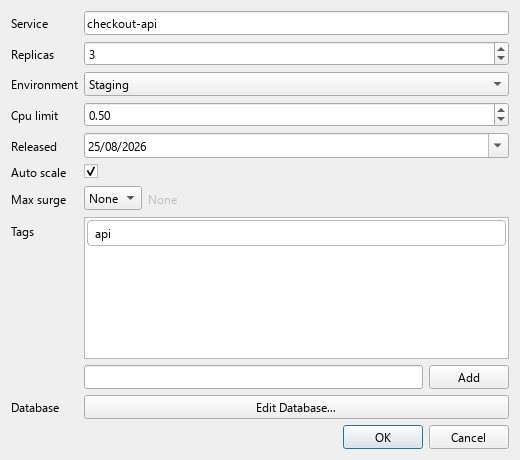
Nothing in that window was written by hand. The spin box range comes
from Field(ge=1, le=50), the two decimal places from
decimal_places=2, the drop-down entries from an Enum, the pre-filled
tag from a default_factory, the type selector from int | None, and
the Edit Database… button from a nested BaseModel.
Why it exists
A brayer is the hand roller a printer uses to lay ink evenly across a forme before taking an impression. This library does the equivalent for a schema: it rolls your model out into a form, and what comes back is a clean impression of it.
Use it when the data is easier to describe as a class than as a UI:
- developer tooling — deploy scripts, migration runners, scaffolding commands: anything with a pile of options a teammate would rather not pass as twenty CLI flags
- internal tools —
input(), but structured, validated, and with a Cancel button that works - settings and config editors — point it at a
pydantic-settingsmodel and the preferences dialog is done - API and service configuration — you already model the request body or the service config; reuse it as the entry form
- prototyping — get something clickable in the same commit as the model, before anyone builds the real interface
What you get
- Validated results. The dialog will not close on OK until the values
pass
model_validate; failures are shown per field. A non-Nonereturn is always a valid instance. - Cancel is distinguishable. Cancelling returns
None, never an empty dict that looks like a fieldless success. - Embeddable.
ModelDialogis a plainQDialog. It reuses an existingQApplication, so it works inside an app that already runs a Qt event loop — andask()can be called as many times as you like. - Extensible. A type it does not know about is one
@register_handleraway, with no edit to this package.
Where next
- Installation — pip, uv, poetry, and the Linux Qt libraries you may need
- Quickstart — worked examples, from a flat model up to nested models and collections
- Supported types — every annotation that maps to a widget, and what each returns
- How it works — the dispatch and handler architecture, and how to add your own type
- API reference — the full public surface
License
GNU General Public License v3 or later. See LICENSE.